The com.codename1.gpu package provides a portable, hardware accelerated 3D
graphics API focused on games but useful anywhere you need GPU rendered content.
It runs from one code base on the JavaSE simulator (OpenGL via JOGL), Android
(OpenGL ES 2), iOS and macOS (Metal), the native Windows port (Direct3D
11), and the JavaScript port (WebGL). The API integrates with the normal Codename
One UI: a 3D scene lives inside a regular component that you add to a Form like
any other.
Your Renderer callbacks run on the native platform render thread — NOT the
Codename One EDT. This is the single most important thing to understand before
you write any 3D code.
onInit, onResize, onFrame and onDispose are invoked on the underlying
OS/GPU render loop (GL / Metal / Direct3D), not on the event dispatch thread.
From inside them you must not touch Codename One UI components, show forms, or
call other EDT-only APIs. To push data back to the UI (for example to update a
HUD label or react to a game event) hop onto the EDT with CN.callSerially(…).
Conversely, treat the GraphicsDevice and the objects it hands you as owned by
the render thread.
CN.isGpuSupported() (or RenderView.isSupported()); on a platform without a
backend the RenderView reports unsupported so you can fall back to 2D.Concepts
The API is intentionally "hybrid": a low level command layer (buffers, textures, render state, draw calls) for full control, plus high level helpers (meshes, materials, a camera) for common cases. Crucially, you never write shader source. Instead you describe a Material (a lighting model plus color and texture) and the engine generates the matching platform shader behind the scenes: GLSL ES on OpenGL ES and WebGL, GLSL on the desktop simulator, Metal Shading Language on iOS and Mac, and HLSL on the native Windows (Direct3D) port. This "engine-managed shader" approach is what keeps the same application code rendering identically across a range of different GPUs.
The main types are:
RenderView - the
Componentthat hosts the GPU surface. You give it aRenderer.Renderer - your callback:
onInit,onResize,onFrame,onDispose. These run on the platform render thread, never the EDT.GraphicsDevice - the command surface passed to your renderer. It creates buffers and textures, clears, sets the viewport, the camera and the light, and issues
drawcalls.Mesh, Material, Camera, Light - the high level scene building blocks.
A first scene: A spinning cube
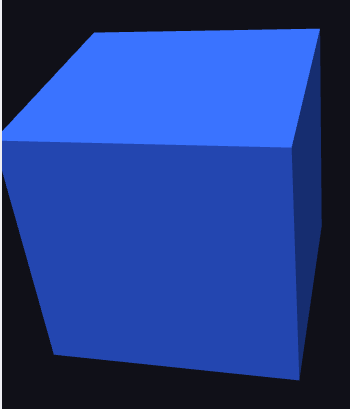
The renderer below draws a Phong lit cube. Primitives.cube builds the geometry,
a Material describes the surface, and a Camera supplies the view. Notice there
is no shader code anywhere.
setContinuous(true) runs an animation loop. For a static scene leave it off and
call view.requestRender() whenever something changes; this conserves battery.
Materials
A Material is a declarative description of a surface. Its Type selects the
lighting model:
| Type | Description |
|---|---|
| Flat color/texture, no lighting. Ideal for UI, emissive surfaces. |
| Diffuse (Lambert) lighting from one directional light. |
| Diffuse + specular highlight (uses |
| Physically based: metallic and roughness ( |
| Unlit, for screen aligned sprites and billboards. |
| Unlit background, rendered behind the scene. |
A material also carries a base color (setColor, packed 0xAARRGGBB), an
optional Texture (setTexture), and a RenderState controlling depth testing,
alpha blending and face culling. Textures come from a Codename One Image or raw
ARGB pixels:
Texture tex = device.createTexture(myImage);     // or createTexture(w, h, argb)
// NEAREST keeps texel edges crisp, which is what the checkerboard in the
// figure below needs. LINEAR is the better default for photographic
// textures, where smoothing is wanted rather than avoided.
tex.setFilter(Texture.Filter.NEAREST).setWrap(Texture.Wrap.REPEAT);
Material m = new Material(Material.Type.UNLIT).setTexture(tex);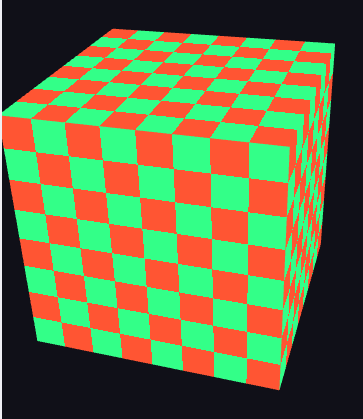
Meshes and buffers
Primitives builds common shapes (cube, quad). For custom geometry, allocate a
VertexBuffer
with a VertexFormat, fill the interleaved float data, and (optionally) an
IndexBuffer:
VertexBuffer vb = device.createVertexBuffer(VertexFormat.POSITION_NORMAL_TEXCOORD, 4);
vb.setData(new float[] { /* px,py,pz, nx,ny,nz, u,v  per vertex null */ });
IndexBuffer ib = device.createIndexBuffer(6);
ib.setData(new int[] { 0, 1, 2, 0, 2, 3 });
Mesh mesh = new Mesh(vb, ib, PrimitiveType.TRIANGLES);
Vertex buffers are allocated through the platform SIMD allocator, which on iOS
(ParparVM) places the data at a fixed, aligned native address so it can be handed
to Metal with no intermediate copy. You don’t need to do anything special to get
this; just write into getData() and call setDirty() when you mutate it.
Loading models
Real scenes use authored geometry. GltfLoader loads a glTF 2.0 model, both the
binary .glb container and the JSON .gltf form with embedded buffers.
loadModel returns the mesh together with the base-color texture from the model’s
own material, so a textured model renders with no extra setup:
InputStream in = Display.getInstance().getResourceAsStream(getClass(), "/boombox.glb");
GltfLoader.GltfModel loaded = GltfLoader.loadModel(device, in);
Material material = new Material(Material.Type.PHONG).setShininess(16f);
if (loaded.getBaseColorTexture() != null) {
    material.setTexture(loaded.getBaseColorTexture());
}
Mesh model = loaded.getMesh();           // draw it like any other mesh
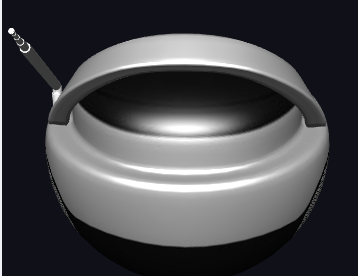
The model below is the Khronos "BoomBox" glTF sample (a CC0 model carrying its own base-color texture), loaded this way and drawn Phong lit:
Animation
Drive a value (a rotation angle, a position) over time and redraw. A continuous
RenderView calls onFrame every frame; an on-demand view redraws when you call
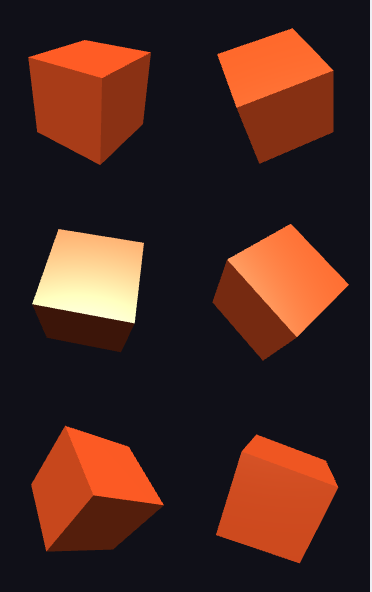
requestRender(). The grid below captures six fixed rotation stages of a spinning
cube, each drawn into its own viewport in a single frame:
Skinned characters are deformed on the GPU. A mesh in VertexFormat.SKINNED
carries up to four joint indices and weights per vertex, and
Material.setSkinning(rows, count) hands the shader the first three rows of
each joint matrix (up to Material.MAX_JOINTS). The vertex stage blends the
joints, and the shadow pass does the same, so shadows bend with the mesh.
AnimatedModel uses this path by itself whenever
GraphicsDevice.isGpuSkinning() is true. On a device without GPU skinning, or
for a skin with more joints than the limit, it falls back to skinning on the CPU.
Camera and math
Camera builds
the view and projection matrices from an eye position, a look-at target and lens
settings (setPerspective or setOrthographic). All matrix helpers live in
Matrix4
(column-major float[16]): translation, scaling, rotation, multiply,
lookAt, perspective, ortho. Pass a model matrix as the third argument to
draw, or null for the identity.
Atmosphere, shadows and post processing
Three settings turn a correctly lit scene into one that looks shot outdoors through a lens. All three start off, so a scene that never touches them renders exactly as before.
An Environment (GraphicsDevice.setEnvironment, or getEnvironment() on a
GameView) holds the atmosphere every draw is shaded in:
Fog — exponential squared in distance, thinned with height, so distant geometry melts into the haze.
Hemisphere ambient — a sky color lights upward faces and a ground color downward ones, which gives shape to everything in shadow.
Tone mapping and exposure — a filmic (ACES) curve, so bright light rolls off instead of clipping.
An open sky —
setSkypaintsSKYBOXsurfaces as a gradient from the horizon to the zenith, with soft clouds and the sun where the light comes from. Draw it on a large sphere around the camera; it needs no texture.
Light.setShadows(true) renders the scene from the light into a shadow map
before each frame, and lit materials are darkened where it’s blocked. Keep
setShadowMap’s extent as small as the view allows and move
`setShadowCenter
with the camera, since the map’s resolution is spread over
the area it covers. A material that shouldn’t cast (grass, particles) says
so with setCastShadows(false).
A PostProcess on the view renders the scene offscreen and adds bloom, a
color grade, a vignette and film grain on the way to the screen. Touch
controls are drawn after it and are never graded.
PostProcess.addPass adds a full screen effect of your own, written with the
same shader nodes as a material. The pass’s BASE_COLOR graph runs once per
pixel: ShaderNode.screenUv() is the pixel’s place on screen and
ShaderNode.sceneColor(uv) reads the frame. Passes run in order before the
built-in effects. A frame with passes leaves out ambient occlusion, depth of
field and the outline, because those read the scene’s depth.
GameView view = new GameView() {
    protected void update(double deltaSeconds) {
    }
};
view.getEnvironment()
        .setFog(0xffb9c6cf, 0.0075f, 0.05f)
        .setHemisphere(0xffa9bdd2, 0xff4f5a3c)
        .setToneMapping(true)
        .setExposure(1.3f)
        .setSky(0xff4f7fb8, 0xffb9c6cf, 0xfffff0d0, 0.45f);
view.getLight().setShadows(true).setShadowMap(2048, 18f);
view.setPostProcess(new PostProcess()
        .setBloom(0.78f, 0.55f)
        .setGrade(1.12f, 0.86f, 0xff0b1720, 0xfffff2dc)
        .setVignette(0.42f)
        .setGrain(0.035f));
Match the horizon color to the fog color and the far edge of the world
disappears into the sky. A device that can’t render shadows or offscreen
says so through GpuCapabilities.isShadowsSupported() and
isPostProcessSupported(), and the scene is then drawn directly. The JavaSE
software rasterizer applies the fog, the ambient, tone mapping and the sky
gradient, but not shadows, clouds or the post chain.
Custom shaders and the shader library
A material’s look can be extended per pixel and per vertex without writing
shader source. com.codename1.gpu.shader.ShaderNode is a typed expression
in Java — arithmetic, mix, smoothstep, noise, texture reads and built in
inputs such as worldPos(), uv(), time() and sunDir() — and every port
prints the same graph as GLSL, Metal, or HLSL. A ShaderMaterial plugs graphs
into hooks of the standard lighting path: VERTEX_OFFSET, BASE_COLOR,
NORMAL, METALLIC, ROUGHNESS, EMISSIVE and DISCARD. A hook left unset
keeps the material’s own behavior, so fog, shadows, the environment and tone
mapping keep working around custom code. A material takes up to 16 uniforms
and 4 textures, set by name with setUniform and setTexture.
// Wet stone: noise bumps, glossy where the noise says puddle.
ShaderNode p = ShaderNode.worldPos().xz().mul(0.6f);
ShaderNode wet = ShaderNode.smoothstep(0.55f, 0.62f, Noise.fbm(p.mul(0.4f), 3));
ShaderMaterial stone = new ShaderMaterial()
        .set(ShaderMaterial.Hook.NORMAL, ShaderNode.mix(Noise.bumpNormal(p, 4, 0.6f),
                ShaderNode.vec3(0f, 0f, 1f), wet))
        .set(ShaderMaterial.Hook.ROUGHNESS, ShaderNode.mix(ShaderNode.f(0.85f),
                ShaderNode.f(0.08f), wet));
Material ground = new Material(Material.Type.PBR).setShader(stone);
Most scenes need no graph at all. com.codename1.gpu.shaders is a library
of ready materials, each built only from public ShaderNode calls, so its
source doubles as a set of examples:
Water—ocean(),lake()andriver(): Gerstner waves, depth color, Fresnel and sun glitter, crest foam.TerrainandFoliage— layered ground by height and slope, rock, and wind sway for plants, leaves and grass.Surface— painted metal, rust, wood, concrete, glass, ice, fabric, car paint, paint splats.Toon,FxandLiquid— toon shading, hatching, flat low poly; dissolve, hologram, force field, beam, fire, smoke, portal, x-ray, pulse; lava, toxic sludge, caustics.Sky— a procedural sky dome in day, dusk, night and overcast moods.NoiseandShading— the building blocks: value, fractal, ridged and cellular noise, bump normals, Fresnel and rim terms.
ScenePresets bundles a light, an environment, a post chain and a sky that
belong together: harbourDusk(), clearNoon(), overcast(), night(),
desert() and arctic().
// A harbour: the dusk preset sets light, fog, ambient and the post chain,
// and every surface comes from the library.
ScenePresets.Preset look = ScenePresets.harbourDusk();
look.apply(device);
Material sky = new Material(Material.Type.UNLIT).setShader(look.getSky()).setFogged(false);
Material sea = new Material(Material.Type.PBR).setShader(Water.ocean()
        .setUniform(Water.WAVE_HEIGHT, 0.6f));
Material quay = new Material(Material.Type.PBR).setShader(Surface.concrete());
Material crates = new Material(Material.Type.PBR).setShader(Surface.paintedMetal());
PostProcess post = look.getPost().setGodRays(0.5f).setFxaa(true);
The post chain also offers FXAA, chromatic aberration and god rays from the
sun’s position (setFxaa, setChromaticAberration, setGodRays).
Three more effects read the depth of the frame. setAmbientOcclusion darkens
creases and the places where objects meet the ground, setDepthOfField keeps
one distance sharp and blurs what’s nearer or farther, and setOutline inks
every silhouette for a toon look. setColorLut then maps the graded color
through a lookup strip, the way a film look is applied in a grading tool;
ColorLuts builds strips (identity, filmic, posterize) to upload with
GraphicsDevice.createTexture(ColorLuts.WIDTH, ColorLuts.HEIGHT, pixels). On
an OpenGL ES 2 device without depth textures the three depth effects are
skipped and the rest of the chain still runs.
A scene can also be drawn into a texture and shown on a surface of another
scene — a security monitor, a mirror, a minimap. createRenderTarget(w, h)
returns the texture (or null where the device can’t render offscreen), and
draws between beginRenderTarget(target, clearColor) and endRenderTarget()
land in it, with a depth buffer of its own. Use it as any material texture
afterward and release it with dispose.
Animated shaders read time(). A GameView advances it every frame; a plain
RenderView calls GraphicsDevice.setTime itself, and a test pins it to
capture the same frame each run.
Many copies of one mesh — crates, rocks, a fleet — draw with
GraphicsDevice.drawInstanced(mesh, material, matrices, colors, count), or
Model.setInstances in a GameView. Each copy gets its own transform and
tint, and a shader tells them apart through instanceId(),
instanceRandom() and instanceColor().
The software rasterizer of the JavaSE simulator evaluates the vertex offset, color, emissive and discard hooks on the CPU, so a custom material keeps most of its look there; normal, metallic and roughness hooks need a GPU.
Platform notes
JavaSE simulator - OpenGL through JOGL, loaded from an isolated class so a missing or failing GL driver degrades to a built in software rasterizer instead of breaking the simulator. Lets you develop and debug 3D without a device.
Android - OpenGL ES 2 via a
GLSurfaceViewhosted as a native peer.iOS and macOS - Metal. Shaders are generated as Metal Shading Language and compiled at runtime; vertex/index data is uploaded to `MTLBuffer`s, zero-copy where the SIMD allocation permits.
Native Windows - Direct3D 11. Shaders are generated as HLSL and compiled with
D3DCompile; the offscreen render target is read back and composited into the UI.JavaScript - WebGL on a
<canvas>peer; the generated GLSL ES runs unmodified.
Querying capabilities at runtime:
if (CN.isGpuSupported()) {
    GpuCapabilities caps = device.getCapabilities();
    Log.p("GPU " + caps.getRendererName()
            + ", max texture " + caps.getMaxTextureSize()
            + ", shader level 3: " + caps.isShaderLevel3());

    // Size the atlas to what this device can actually hold rather than
    // assuming a figure: the limit is as low as 2048 on older hardware.
    int edge = Math.min(2048, caps.getMaxTextureSize());
    Log.p("atlas edge " + edge);

    if (caps.isIntIndicesSupported()) {
        // 32-bit indices are available, so a mesh may exceed 65535 vertices
    }
}
Threading
Renderer callbacks run on the platform render thread, not the Codename One EDT.
Don’t touch UI components from inside them. To move data the other way (for
example to update a HUD label from a game loop), use CN.callSerially(…).